Client work
Gym Check-In
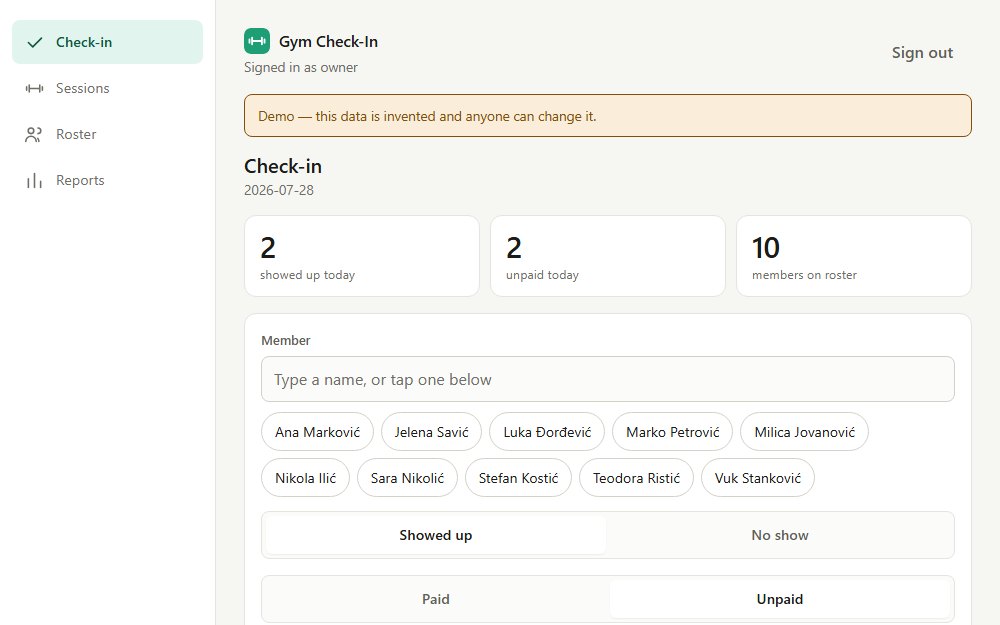
Front-desk attendance, training sessions and memberships — built for a phone held at a busy counter.
The brief
A gym was tracking attendance, personal training and membership payments on paper and in a spreadsheet. The immediate ask was simple — record who came in — but the problem underneath it was that nobody could answer questions the business actually cared about: who is training with which trainer, who has quietly stopped coming, and who is still walking through the door on a membership that lapsed weeks ago.
It needed to work at a front desk, on a phone, in the seconds a member takes to walk past. Anything slower than that and staff go back to paper.
The constraints
- The real device is a phone on a counter. Not a desktop with a keyboard. One thumb, often mid-conversation.
- No per-person logins. A front desk is shared and shift-based. Making every staff member remember a password would guarantee one shared sticky note.
- Two roles, one of which must not leak. Staff record attendance; only the owner sees the reports.
- Corrections must be possible without rewriting history. Money was involved, so an edit that silently changes the past is worse than no edit at all.
- Day one begins with the app knowing nothing. There is no historical payment data to import.
The decisions
The app counts. It does not calculate money.
Trainer bonuses were the original motivation, and the app deliberately refuses to work them out. It reports individual sessions, group sessions and how many people attended; the owner applies their own formula outside it.
The formula changes with negotiations and circumstance. Encoding it would mean the software is wrong every time the business changes its mind, and quietly wrong in a place involving somebody's pay.
What it costs: a manual step remains, every month. That step is where the judgement lives, and it belongs to a person.
Payments are a log. The expiry date is a cache.
Membership runs as a rolling thirty days from payment, extending from the existing expiry when someone renews early so nobody loses days by paying on time. The authority is an append-only payment log; the date shown on a member is recomputed by replaying it, by exactly one function in the codebase.
Mistakes are corrected by voiding, never by deleting. A voided payment stays visible as a neutral entry with no further action available, so the record shows both what was entered and that it was undone.
What it costs: more machinery than storing a date on the member row. It buys the ability to answer "why does it say that?" — which, for anything touching money, is the whole game.
"Attending but expired" — the filter that justified the project
Members can be filtered by expiring soon, expired, never paid, quiet for a week, quiet for two — and by the combination that matters most: an expired membership plus attendance in the last few days.
That is revenue walking through the door unbilled, and under the old process it was invisible, because attendance and payment lived in different places and nobody cross-referenced them. It is available to front-desk staff as well as the owner, because chasing a renewal is front-desk work.
What it costs: nothing except that someone has to look. Which is why it is a filter chip on the members screen and not a report the owner opens monthly.
Role separation enforced on the server, not in the menu
Two shared passwords, staff and owner, matching how the desk actually operates. The reports screen is hidden from the staff navigation — and also refuses the request with a 403 if it is called directly. Hiding a link is presentation; the check is the security.
What it costs: shared credentials mean the log cannot attribute an entry to an individual. That was the right trade for this desk and would be the first thing to revisit if it stopped being.
Day one tells the truth: it doesn't know who has paid
On the first morning every member reads "no payment recorded", because the app genuinely has no idea. Rather than dress that up, "Never paid" is a filter — so the first day's task list is the screen itself, and it empties as the desk records each current member once.
What it costs: an alarming first screen, which staff need warning about before they open it.
Built with
- Vanilla HTML, CSS & JS
- No build step
- Cloudflare Pages
- Pages Functions
- D1 (SQLite)
- Token-driven design system
- Automatic dark mode
One responsive shell serves both layouts — a bottom tab bar below 768px, a sidebar above it — so there is one interface to maintain rather than a phone version that drifts from a desktop version. The public demo is seeded with invented people; the real deployment is private and separate.
This is client work. The business isn't named here, and nothing about its people, location or operations appears on this page.